Sunday, February 3, 2019

Tiny Calculator: Improved CORDIC


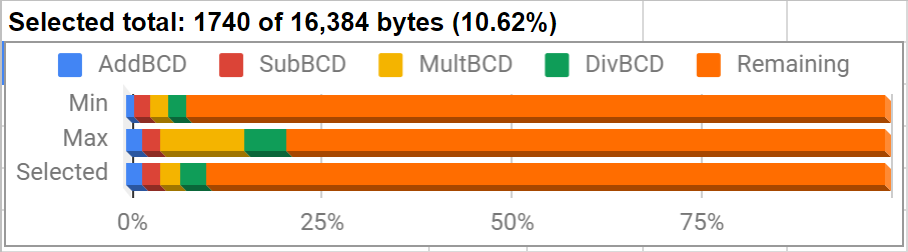
Since my last post I have made a lot of changes to the CORDIC routines I was working on. As you can see in the chart above, the new version fits in less than the 4.1k of the last version even after adding in logarithms. The change came after I found an article about how the HP-35 did CORDIC calculations. Unlike the other descriptions of the method I have used, this version uses an atan table of powers of 10 instead of powers of 2. This lets you shift the arguments by whole decimal places, which is much faster with BCD numbers than powers of 2 . Before, I had wondered if this would be more efficient, but I don't understand the math behind it well enough to modify the routine myself. My implementation of the method the HP-35 uses only takes 90k cycles, compared to the 1.18 million of the last version. The X and Y that the calculation produces, however, cannot be scaled to produce sine and cosine directly. The scale factor depends on the number of rotations, which is easy to precalculate when the angle is halved every iteration, but not possible to know in advance when you use powers of 10 since each iteration requires up to 9 calculations with each affecting the scale factor. As a result, the ratio of X and Y provides the tangent and the HP-35 used identities involving multiplication, division, and square root to generate sine and cosine from tangent. In addition to the 90k cycles for the CORDIC calculation, I would need at least another 140k cycles for these identities. This is 5 times faster than how I was doing it before, although I'm afraid the accuracy would suffer from the added calculations.

The next thing I tried was posting on the HP museum forum, where Thomas Klemm showed me how to do CORDIC calculations in base 10 without resorting to identities. This was a huge help and a much better way to do things than anything I have tried before. The newest routine I have calculates tangent in only 186k cycles and provides sine and cosine without additional calculations! Like in Thomas' version, I tried to make this CORDIC routine more generic so that I can reuse it for inverse trig functions too. Logarithms and powers of e turned out to be much simpler than trig functions using the method described on the same page about the HP-35.

There are still a lot of things to learn about MSP430 assembly. One thing that tripped me up was thinking that RRA automatically shifts a 0 in from the left when rotating when it actually reproduces the leftmost bit instead. Another surprise was that shifting packed BCD by two decimal places is just as fast loading a word from memory, swapping and combining bytes, then writing the result back to memory as it is to just copy bytes directly. I thought the byte copies would be faster, but I was actually able to shave one cycle off by loading and writing words. I rewrote this short section of code five different times trying to save a cycle or two and eventually realized that this is not a useful way to spend my time. This improvement is too tiny to ever be noticeable, and I want to finish this project soon. There are a few other small improvements I have not spent time on since they would provide only a negligible speed up.

The next step is to start working on hardware and the interface code.

Sunday, December 30, 2018

Tiny Calculator: Sine, Cosine, and Tangent

For the trig functions, I started building the same angle table that I used for the CORDIC routines in my RPN Scientific Calculator. Comparing my table to an example calculation I found of how CORDIC works, I noticed that the values are all pi times bigger than the ones in the example. Could I have made the same mistake in my RPN Scientific Calculator? When I get back home from the holidays, I should check to make sure that this does not throw off some of the calculations. Another thing I found out from the same page was that the K value to multiply by after the CORDIC calculation is calculated for a particular number of iterations. In my RPN Scientific Calculator, I included a K value for the maximum number of iterations and truncated it when less precision was used. On second thought, I should have done some testing to make sure truncating the K value to the precision of the argument always yields the best results for a particular level of precision. At the moment I don't plan to redo anything on my older calculators unless something is majorly wrong. It is good, though, to recognize this type of mistake, so I can look out for it in future projects that use CORDIC.

To generate the angle table I used the bc command line calculator. It has a very simple programming language that can run from a script. Interestingly, bc does not seem to do any type of rounding, so the tables I have are unrounded. Maybe I will experiment with a rounded table to see how much of an effect it has. For some of the other tables (including a couple I ended up not needing) I used Python, which has been really helpful. The table itself contains angles descending in size, so I only sto

The first step to implementing the trig functions was replicating the CORDIC calculations in a spreadsheet. This works for about 30 iterations until the numbers become too small for the spreadsheet to handle. Rather than doing bit shift operations like I would on the microcontroller, I multiplied by inverse powers of two, which accomplishes the same goal. When I had that working, I tried generating those multipliers on the MSP430 and multiplying, rather than bit shifts. I thought this might be fairly fast since the multiplier could be left in binary, which makes it quicker to use with the Russian Peasant algorithm, and the amount of zeroes in the multiplier would mean relatively few multiplies altogether. Consider this shortened table of successive inverse powers of two:

Friday, December 14, 2018

Tiny Calculator: Four Functions

The last few weeks I have gone down a little bit of a rabbit hole writing BCD math routines for my Tiny Calculator project. The goal has been to compare different calculation strategies to find which ones are fast but still small enough to fit in the 16k of flash the MSP430 I am using has. Like the addition routines I wrote about in my last post, all of these routines were a lot smaller than I expected. There were also some other surprises about what worked best.

Subtraction
To start with, I based this routine on the setup code for the addition routine, which saves some space. Originally my plan was to make everything modular so that I could substitute pieces of code in depending on what size and speed trade off I wanted, which is why I have separate body and ending options in the table for my addition routine. However, to save space and build one routine off the parts of another, it makes more sense to decide which version to use at the beginning. The only big difference between the two subtraction routines I tried was rolling and unrolling the main loop, with the unrolled version being about 75% faster. It's also about 25% larger but that is only around 50 bytes.

Multiplication
In addition to the straightforward method of repeated additions, I tried the quarter squares and Russian peasant algorithms I learned about doing 6502 BCD multiplication. It was a surprise that using quarter squares was over 10% slower on the MSP430 than the Russian peasant algorithm, whereas it was over 4 times faster on the 6502! Part of the difference may be the speed up I get on the MSP430 by converting each digit of one argument to binary (so it can be halved) only once and saving it, rather than converting it every time like on the 6502. Another major difference is how much slower accessing tables on the MSP430 is compared to register operations. It's interesting how the timing of the architecture can decide which algorithm works the fastest. It's also great that the Russian peasant algorithm doesn't need any tables and is therefore much smaller.

Sunday, November 4, 2018

New project: Tiny Calculator

My Pocket Calculator project has been on the back burner for a few months while I finish my master's thesis. In the mean time, I got interested in doing a much simpler project to make a very small calculator that will hopefully be about 2.5 inches long. This is the size of a 5x5 keypad and the small 128x32 LCD I want to use. Like my first first calculator, it will use a through hole MSP430. The first calculator needed two MSP430s to contain all the firmware, but I think I can fit everything on one chip for this project. It should also be possible to do what I want with the 512 bytes of internal RAM the chip has, so I won't need any external SRAM, and with 25 keys, I also won't need external shift registers. Other than the microcontroller and some capacitors, the only other thing on the board will be a CR2032 battery. The MSP430 needs 2.7v to run at 16MHz, so I plan to run at 8MHz in order to use the battery down to 2.4v. It might be possible to monitor the battery and run at 16MHz as long as the voltage is high enough, but I don't think I will need the extra speed like I did on the last calculator.

One of the main things that got me interested in this project was finding out that the MSP430 has a decimal add instruction that works on packed BCD words. This is really convenient and should be many times faster than doing BCD manually in C like I did for my first calculator. One possibility would be mixing C and assembly to take advantage of features like this, but I am going to try to do the whole thing in assembly to make it as small and fast as possible. Another speed up should come from switching to a 16 byte floating point format. This will let me calculate logarithms and trig functions to the same precision as my first calculator but fit everything in the 512 bytes of internal RAM. Eliminating the bottleneck of transferring data over SPI one bit at a time will probably be the main speed up. For multiplication, I want to try some of the algorithms I tested for the 6502, and for division, I will try out some based on Netwon's Method. For logarithms and trig functions, I'll probably use CORDIC routines again, but I want to see if Taylor polynomials will be much smaller, even if they are slower. With 25 keys, I can fit in just about everything from my first calculator. It should be able to do a little more than an HP-35. The main drawback compared to my first calculator will be less precision with large numbers and less stack space, although neither should be a problem, since there won't be a programmable mode. Also, I plan to keep track of exponents by the byte, rather than the nibble like a did on the first calculator. This will mean losing precision by a factor of 10 in some cases, but it will make aligning numbers during calculation much simpler.

Sunday, June 24, 2018

Calculator Processors

Most of the microcontrollers and processors I have looked into using have been for my calculator projects. That's one of the main reasons I did my microcontroller comparison a few years ago. Recently, I have gotten interested in other chips I could use for calculator projects, in addition to the 6502, 6800 family, and 8051 chips I was interested in before.

The main two criteria I have are an external memory bus and through-hole package. Right away, this eliminates most modern microcontrollers, since almost all of them with an external memory bus are SMD only. In theory, I could use a chip without an external bus if it had a few hundred KB of RAM for data and a few hundred more KB of RAM or flash for program space, but I haven't found that in a through-hole package. Another point is that I would like the ability to load programs from an SD card, which is impractical if I need to have the chip reflash itself every time I load a program. Through-hole parts are more convenient to solder, and I would like to do a few more projects with them before I try to start making surface mount boards.

Modern microcontrollers
  • AVR - None of the ATmega series has an external bus. Some of the ATxmega series do, but they don't come in through-hole packages.
  • PIC - For a through-hole part, the PIC32 series is very impressive at 50mhz with 64KB RAM and 256KB of flash, but even this is not enough for what I am planning. The chip requires a separate programmer, and the compiler offers limited optimizations unless you pay, which is absurd in 2018 compared to its competition. It does have something called PMP, which offers a sort of data bus, but it can only address 12 bits, since the DIP part only has 28 pins. 
  • MSP430 - This chip worked well for my RPN Scientific Calculator, but it also lacks an external bus.
  • Propeller - This is an interesting chip but like the others, it lacks an external bus and does not have enough flash or RAM. The one interesting possibility is doing several calculations in parallel, although I don't know how I would use that for a calculator.
  • Zilog - They have some nice chips, including some processors with external buses, but I would like to use something different than what the TI-83 and similar models use.
  • LPC1114 - I really like this chip, and I am using it in my Pocket Calculator, but it also lacks an external bus, and it seems that it is no longer manufactured.

Saturday, January 20, 2018

Pocket Calculator: Hardware

In the last two weeks I have made a lot of progress on my Pocket Calculator. Normally, I like to breadboard everything and have it working 100% before I solder anything, but I had to speed things up since I was leaving home where all my electronics stuff is. So far, the project has turned out reasonably well with only a few hiccups.

Microcontroller: LPC1114
First of all, I had to get out my old LPC1114s and figure out how to program them again, since I haven't worked with them in over 2 years. Like before, it was really easy to do so with an FT232 cable. After frying an MSP430 Launchpad a few years ago by accidentally giving it 5v from the cable, I was really careful about hooking it up this time. One thing I do is leave the cable unconnected from USB until I recheck all the connections, which saved me this time since I had accidentally plugged into the 5v line again.

Looking on the internet I was surprised to see that no one seems to sell the LPC1114 in DIP28 any more. That means the three that I have left might be the last ones I have to play with. There was some sort of announcement a few years ago that NXP would stop producing the chip then they changed their mind after someone pointed out that the company had promised to keep its chips in production. It looks like they might have decided to stop producing them after all, although they are listed as in production until at least 2022 on the NXP longevity page. One interesting thing I found was a listing for the chip in PLCC44 package with 8KB of RAM instead of the 4 the DIP version has. I'm not sure if those ever made it into production but it would be cool to have one to play with.


Friday, December 22, 2017

Pocket Calculator: Stack

For this calculator, I am working on a more sophisticated stack system than I had for my RPN Scientific Calculator. Instead of stack items being fixed at the maximum length, which wastes a lot of memory, item length varies. With only 4k to work with on the LPC1114, it will be very important to conserve memory wherever possible. As I have it now, each item has a header that indicates its position on the RPN stack, its name, and an ID number for variables in functions. RPN stack positions start at one so that variables marked zero will not appear on the RPN stack. This is useful for named variables, so that they can use the same stack system internally. The ID numbers will allow me to keep track of variables local to functions, so I can easily clear them when the function exits.

The system I have now writes the result of an operation directly to the top of the stack then marks the two consumed items as free memory. This has the advantage of allowing the result to be larger than the operands, which can be useful for things like string concatenation. The screenshot above shows how I was testing the system in C# with a simple calculator that can only add. Freeing items like this will make the stack grow fairly quickly and eventually require garbage collection. The advantage, however, is that calculations should be very fast until garbage collection is required. A slower method would be to scan the stack for a free section that is large enough for the result before adding to the stack, but this will eventually require garbage collection as well. My suspicion is that just adding to the top of the stack will be faster overall, even if garbage collection happens more often.

To keep track of the memory, I decided to implement my own garbage collection system, since malloc in C would lead to unrecoverable fragmentation. On IRC one day I made the mistake of asking about how to implement garbage collected stacks like these internally and ended up wasting over an hour arguing with someone who was convinced I was going about everything totally wrong. In the end, one of the suggestions was to have the calculator user push a 0 onto the stack manually before entering values to be operated on so that the system can overwrite the 0 with the result. This recommendation (and a few of the others given) were just laughably horrible and would seriously cripple the functionality of the calculator. Sometimes people on IRC can give good suggestions, but I also have to remind myself not to argue with people who don't really know what they are talking about but won't admit it.

One of the useful suggestions given by a different person was to use two stacks for calculations. The result goes on the second stack and is then copied back to the main stack overwriting the consumed operands. In theory this system will never need garbage collection, although it seems to me that it will take the same amount of time on average. It may be simpler since calculating free memory, for example, is comparing just one pointer, rather than crawling the stack adding up free chunks. This system assumes, however, that operations always work on the top of the stack, which is not the case when named variables share the same internal stack as the RPN stack. It might make more sense in that case to use the second stack only for named variables and do garbage collection on that stack, while keeping the first stack RPN only to prevent garbage collection.